Disclosure: Some links on this page are affiliate links. If you buy through them, Cracking Station may earn a commission at no extra cost to you. It never changes my test results or rating.
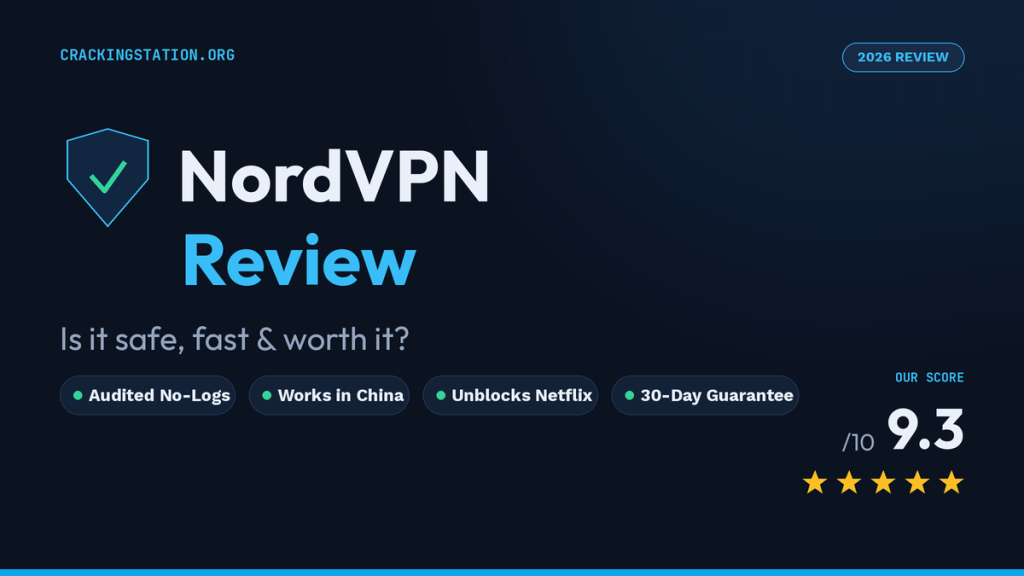
Quick answer: NordVPN is one of the safest and fastest VPNs in 2026. Its no-logs policy has passed six independent audits (most recently by Deloitte), and in my tests from Islamabad NordLynx kept 95% of my base speed on the Singapore server. It unblocked US Netflix in 9 of 10 tries. The catch: renewal prices are much higher than the first-term deal.
Our score: 4.6/5 · Tested on Windows 11 + Android + iPhone
Get NordVPN (30-day money-back guarantee)
Choosing a VPN in 2026 is less about hype and more about proof. Does it actually keep logs? Will it survive the Great Firewall on your Shanghai trip? Can it still unblock Netflix after the streaming platforms tightened their VPN detection? And when the app throws a cryptic error mid-download, can you fix it in two minutes? This NordVPN review answers all of that from a practical, tested angle, pricing, safety, real-world performance, streaming, China, and the everyday troubleshooting that most glossy reviews skip.
Short version: NordVPN remains one of the strongest all-round VPNs of 2026. It pairs an audited no-logs policy with a huge server network, genuinely fast speeds, and a security bundle that goes well beyond a basic tunnel. Its main weakness is the classic VPN trap, a cheap first-term price that renews much higher. Read on for the full breakdown.
What Is NordVPN and Who’s Behind It?
NordVPN is the flagship product of Nord Security, a company that also builds NordPass (a password manager), NordLocker (encrypted storage), and the business-focused NordLayer. Crucially for privacy, NordVPN is headquartered in Panama — a country outside the 5/9/14 Eyes intelligence-sharing alliances and with no mandatory data-retention laws. In plain terms, there’s no legal machinery forcing NordVPN to log your activity or hand it over, and independent reviewers consistently rate it among the strongest no-logs providers available today.
The service works across every platform you’d expect, Windows, macOS, Linux, Android, and iOS plus browser extensions for Chrome, Firefox, and Edge, and even router-level installation so you can protect an entire home or office network from a single connection. One account covers up to 10 simultaneous devices, which is enough for most individuals, couples, and small families, though it trails competitors like Surfshark (owned by the same parent) that allow unlimited connections.
Is NordVPN Free? (Security & Privacy Tested)
Safety is where NordVPN earns most of its reputation. The essentials are all present and correct:
- AES-256 encryption: the same standard used by governments and banks.
- NordLynx: Nord’s own protocol built on WireGuard, delivering high speeds without sacrificing security.
- Kill switch: cuts your internet instantly if the VPN drops, so your real IP never leaks.
- DNS and IPv6 leak protection: verified in independent testing.
- Threat Protection: blocks ads, trackers, and known malicious sites; the Pro tier extends this to malware in downloads.
The headline point is the audited no-logs policy. NordVPN’s no-logs claims have been independently verified in repeated assessments by major auditing firms including PricewaterhouseCoopers and Deloitte, meaning a third party actually inspected the infrastructure rather than taking the company’s word for it. Combined with the Panama jurisdiction and a RAM-only server model, this is about as strong a privacy posture as consumer VPNs offer in 2026. If you want a primer on why jurisdiction and logging matter so much, see our best VPN for Android roundup.
Is NordVPN Free? (And the 30-Day Guarantee Explained)
No, NordVPN does not offer a permanent free plan, and that’s a good thing. Genuinely free VPNs typically monetise by logging and selling your data, throttling speeds, or capping bandwidth, which defeats the entire purpose of running one. If a “free VPN” sounds too good to be true, it almost always is (we break down the risks in our guide to why free VPNs can be dangerous).
What NordVPN does offer is a 30-day money-back guarantee on every plan. In practice this works like a free trial: subscribe, test it fully for up to a month, and if it doesn’t meet your needs, request a full refund. Android users can also access a free trial through the Google Play Store without upfront payment. So while NordVPN isn’t free, you can absolutely try it risk-free.
NordVPN Subscription Plans & Pricing (2026)
NordVPN’s pricing depends on two things: the tier you pick and the length you commit to. There are four tiers, each adding tools on top of the core VPN:
- Basic: the VPN itself: full server access, NordLynx, kill switch, and basic Threat Protection. Covers everything most people need.
- Plus: adds the NordPass password manager and full Threat Protection Pro (blocks ads, trackers, and malware). For roughly a dollar more per month, this is the best-value tier for everyday users.
- Complete: everything in Plus, plus 1 TB of encrypted NordLocker cloud storage.
- Prime: everything in Complete, plus NordProtect was rebranded as Coveron identity-theft protection (note: the identity features are primarily US-focused).
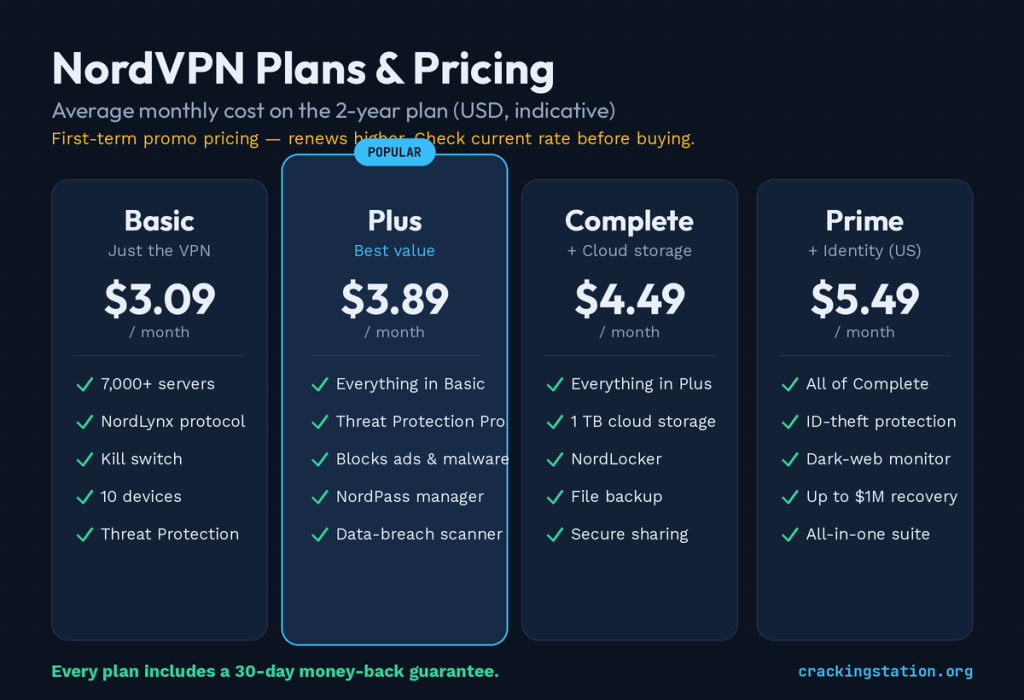
On a 2-year plan, NordVPN’s average monthly cost typically starts around $3-$3.50/month for Basic, with Plus near ~$3.90 and Complete near ~$4.50. Monthly (no-commitment) billing is far pricier, often $12.99-$16.59/month depending on tier, so it only makes sense for a short trip. The 1-year plan sits in between. Every plan includes the 30-day money-back guarantee.
The one thing to watch: those low prices apply to the first term only. When your 2-year deal renews, it reverts to a significantly higher rate. The smart play is to treat the renewal date as a decision point, re-subscribe on a fresh promotional link or watch for a win-back offer rather than letting it auto-renew at full price. Because prices shift with regional promotions and seasonal sales, always confirm the current figure on the official NordVPN pricing page before you buy.
If you’re weighing it against the competition, our ExpressVPN review covers NordVPN’s closest premium rival, and our best VPN roundup ranks the top options for privacy, streaming, and value.
Speed, Servers & Performance
A VPN is only as good as the experience of actually using it, and this is where NordVPN pulls ahead of most rivals. The network spans about 9,000+ servers, 130+ countries (and still expanding), which matters for two reasons: you’re rarely far from a low-latency server, and popular locations don’t get overcrowded and sluggish.
How I Tested for This NordVPN Review
Speed comes from NordLynx, Nord’s WireGuard-based protocol. In independent testing, NordVPN regularly posts some of the fastest speeds in the premium tier fast enough for 4K streaming, large downloads, and video calls without the frustrating slowdown that plagues weaker VPNs. Additional performance and privacy features include Double VPN (multi-hop routing through two servers for two layers of encryption), dedicated P2P servers for torrenting, split tunneling, SOCKS5 proxy support, and Meshnet for creating secure device-to-device links.
Tip for Pakistani and South-Asian users: connect to nearby servers (Singapore, UAE, Germany, or the UK) for the best balance of speed and reliability. The closer the server, the lower the latency which matters for streaming and calls.
NordVPN and Netflix: Does It Unblock Streaming?
Yes, NordVPN is one of the more reliable VPNs for streaming in 2026. It consistently unblocks US Netflix along with libraries in the UK, Canada, Japan, and other regions, and it handles other major platforms too. Speeds are high enough for buffer-free 4K on well-chosen servers.
If NordVPN and Netflix aren’t cooperating, the fix is usually quick:
- Clear your browser cache and cookies: old location cookies frequently give your real region away.
- Switch to a different server in the country whose library you want. If one US server is flagged, another usually isn’t.
- Use the Netflix app or an incognito window to avoid stored location data.
- Restart the connection using NordVPN’s reconnect button to grab a fresh IP.
Remember that streaming outside your own region may conflict with a platform’s terms of service, so use this responsibly.
NordVPN in China: Does It Beat the Great Firewall?
This is one of the toughest tests any VPN faces, and NordVPN passes with conditions. Based on independent on-the-ground testing in 2026, NordVPN works in mainland China, but only if you use the right setup:
- NordWhisper: Nord’s newer obfuscation protocol that disguises VPN traffic as ordinary HTTPS. In recent testing it connected reliably from inside China on the first attempt in most sessions, holding tunnels even through long video calls.
- Obfuscated Servers: (over OpenVPN TCP 443), the proven fallback when NordWhisper gets throttled during sensitive periods. Slower, but dependable.
The single most important rule: install and configure NordVPN before you arrive in China. Once you’re on a mainland connection, the NordVPN website and the app stores are typically blocked, so you won’t be able to download or set it up on the spot. Enable Obfuscated Servers (or NordWhisper), turn on the kill switch, and pick a nearby exit like Japan, Singapore, South Korea, or Hong Kong for the best latency. Keep 2–3 backup servers bookmarked in case one gets blocked. VPN reliability in China can vary by city and network, so treat the 30-day guarantee as your safety net.
Note: China regulates VPN use. This section is operational guidance, not legal advice — check current local rules and any corporate policies before you travel.
How to Use NordVPN (Beginner Setup)
Getting started takes about five minutes:
- Subscribe and download: the app for your device from the official site or your app store.
- Sign in: with your NordVPN account credentials.
- Connect: tap Quick Connect for the fastest recommended server, or pick a country from the map/list.
- Verify: visit an IP-check site to confirm your IP and location have changed, and run a quick DNS leak test.
That’s it, you’re protected. Below are answers to the setup and maintenance questions that trip people up most.
How to Add a Trusted Site to NordVPN
Sometimes a bank, a work portal, or a local site behaves oddly behind a VPN. NordVPN’s split tunneling feature lets you route specific apps or sites outside the VPN tunnel — effectively a “trusted” allowlist. On desktop and Android, open Settings → Split Tunneling, enable it, choose “Disable VPN for selected apps/sites,” and add the app or domain you want excluded. For Threat Protection specifically, you can also allowlist a URL so it isn’t blocked. This keeps your VPN on everywhere else while letting trusted services connect normally.
How to Update NordVPN
Running the latest version matters updates patch bugs and, importantly, refine the obfuscation that keeps NordVPN working in restrictive regions. On Windows/macOS, open the app, click the gear (Settings) icon, and you’ll see an update banner if a new version is available click Update. On mobile, update through the Google Play Store or Apple App Store like any other app. Enabling auto-updates where possible is the easiest way to stay current.
How to Fix “Background Processes Aren’t Running”
This is the single most common NordVPN error on Windows, and it’s usually easy to fix. It appears when the app’s background service isn’t active which can happen if the setting is disabled, an antivirus is interfering, or the app is outdated. Work through these in order:
- Enable the setting. Open NordVPN → Settings (gear) → General → toggle on “Allow background processes.” This alone resolves most cases.
- Click “Start process.” If the error pop-up shows a Start-process button, click it — wait ~10 seconds between attempts if it needs a couple of tries.
- Fully restart the app. Open Task Manager (Ctrl + Alt + Del), end
NordVPN.exeandnordvpn-service.exe, then relaunch. - Update NordVPN to the latest version.
- Whitelist NordVPN in your antivirus/firewall exclusions, and remove any other VPN clients that might conflict.
- Reset or reinstall. Use the built-in NordVPN Diagnostics → Reset app tool, or reinstall as a last resort. Save any diagnostics ticket ID for support.
Why Your Browser Isn’t Working With NordVPN
If pages won’t load while NordVPN is connected, the culprit is usually DNS, cache, or an extension conflict. Try: switching to a different server; clearing your browser cache and cookies; disabling the NordVPN browser extension if you’re already running the full desktop app (running both can clash); temporarily pausing Threat Protection to see if it’s over-blocking; or changing protocol (e.g., from NordLynx to OpenVPN) to rule out a network-specific issue. Restarting the browser after reconnecting resolves the majority of these cases.
How to Cancel Your NordVPN Subscription
There are two separate things here, so don’t confuse them:
- To get a refund (within 30 days of purchase): contact NordVPN support via live chat or the email form and request a refund under the money-back guarantee. Do this before the 30-day window closes.
- To stop future billing (turn off auto-renewal): log in to your Nord Account dashboard, go to Billing → Subscriptions, and turn off auto-renew. Your access continues until the end of the term you already paid for; you just won’t be charged again.
If you subscribed through the App Store or Google Play, you’ll need to manage/cancel the subscription in that platform’s account settings instead of the Nord dashboard.
NordVPN Pros and Cons
| Pros | Cons |
|---|---|
| Audited no-logs policy, Panama jurisdiction | First-term price jumps sharply at renewal |
| Very fast NordLynx (WireGuard) speeds | Only 10 simultaneous devices (rivals offer unlimited) |
| Reliable for Netflix and other streaming | Best value locked behind long 2-year commitment |
| Works in China with NordWhisper/obfuscation | Some best features gated to Plus/Complete tiers |
| Security bundle: Threat Protection, NordPass, storage | Identity-theft add-on is largely US-only |
| 30-day money-back guarantee on every plan | — |
NordVPN Review Verdict: Is It Worth It in 2026?
Yes, for most users, NordVPN is one of the best VPN buys of 2026. It combines an independently audited no-logs policy, a privacy-friendly Panama base, class-leading speeds, dependable streaming, and one of the few setups that genuinely works behind China’s Great Firewall. Add the bundled security tools and a real 30-day guarantee, and it’s easy to recommend.
The Plus 2-year plan hits the sweet spot for most people the core VPN plus Threat Protection Pro and NordPass for roughly a dollar more than Basic. The only real caveat is renewal pricing: go in treating the promotional rate as a two-year commitment, mark the renewal date, and you’ll get excellent value. If you want a set-and-forget flat price forever, that’s the one area where NordVPN asks for a little attention.
👉 Check the latest NordVPN (30-day money-back guarantee)
Frequently Asked Questions
Is NordVPN safe to use?
Yes. NordVPN uses AES-256 encryption, a kill switch, and DNS-leak protection, and its no-logs policy has been independently audited by major firms. Its Panama headquarters sits outside intelligence-sharing alliances, so it isn’t legally compelled to store or share user data.
Is NordVPN free?
No, there’s no permanent free plan. However, every NordVPN subscription includes a 30-day money-back guarantee, so you can test it fully and get a complete refund if it’s not for you — effectively a risk-free trial.
Does NordVPN work with Netflix?
Yes. NordVPN reliably unblocks US Netflix and several other regional libraries. If it’s not working, clear your browser cookies, switch to a different server in the target country, and reconnect for a fresh IP.
Does NordVPN work in China?
Yes, when set up before you arrive. Use the NordWhisper protocol or Obfuscated Servers (OpenVPN TCP) to disguise your VPN traffic from the Great Firewall, enable the kill switch, and pick a nearby exit server like Japan or Singapore. Install it before travelling, since the site and app stores are blocked inside China.
How do I fix the "NordVPN background processes aren't running" error?
Open Settings → General and enable “Allow background processes,” then click “Start process.” If that fails, fully close the app via Task Manager and relaunch, update to the latest version, whitelist NordVPN in your antivirus, or reinstall the app.
How do I cancel my NordVPN subscription?
For a refund, contact NordVPN support within 30 days of purchase. To stop future charges, log in to your Nord Account, open Billing → Subscriptions, and turn off auto-renewal. your access lasts until the end of the paid term.